Let DataSnipe suggest a schema for https://arxiv.org/pdf/2601.14701
Works with your AI assistant
 Upload URL
Suggest extraction schema
Upload URL
Suggest extraction schema
Run extraction
Get job group
Get extraction results
Your agent gets the files. DataSnipe finds the data.
DataSnipe gives your AI assistant a reliable way to work with PDFs, scans, and images. Ask it to find the fields you need, review the evidence, and deliver consistent, traceable results.
Used DataSnipe integration · 3 notes
I’ll fetch that public paper and ask DataSnipe to suggest an extraction schema.
Upload URL
The PDF is stored. Now I’ll ask DataSnipe to suggest a schema for it.
Suggest extraction schema
DataSnipe fetched the paper and suggested this extraction schema:
| Field | Type | Description |
|---|---|---|
title | string | The title of the research paper |
authors | string | The authors of the paper |
publication_date | date | The date of publication |
arxiv_id | string | The unique arXiv identifier if available |
abstract_summary | string | A brief summary of the paper’s main objectives or findings |
Want me to run the extraction with this schema as-is, or refine it first?
Add a list field for findings, and proceed with the extraction. Use a cheap model.
Run extraction · 1 note
I’ll add a findings list field and run the extraction with gemini-3.5-flash-lite.
Run extraction
Extraction is running with the updated schema using gemini-3.5-flash-lite.
Review and download the results in DataSnipeWant me to pull the results into this conversation once the job finishes?
Report now
Used DataSnipe integration · 1 note
Get job group
The job’s done. Pulling the results.
Get extraction results
Extraction complete. Here’s the report for arXiv 2601.14701:
Title: Regulatory Expectations for Bayesian Methods in Drug and Biologic Clinical Trials: A Practical Perspective on FDA’s 2026 Draft Guidance
Author: Yuan Ji, PhD
Published: January 2026
arXiv ID: 2601.14701v1
Abstract summary: A practical, regulatory-oriented synthesis of the FDA’s January 2026 draft guidance on Bayesian methodology in clinical trials, focusing on success criteria, prior specification, operating-characteristic evaluation, and computational transparency.
Key findings
- Success criteria must be defined via posterior probability with a justified, meaningful threshold.
- Prior specification requires a documented rationale, robustness methods, and a plan for prior-data conflict.
- Operating characteristics must be evaluated through prospective simulation across multiple scenarios.
- FDA guidance permits frequentist-calibrated and purely Bayesian designs when operating characteristics are agreed.
Scroll or select text at any time
Built for MCP-compatible tools
Connect the assistant you already use to reliable document extraction.
DataSnipe brings consistent, auditable, repeatable data tables to agents through the open MCP standard.



Why not just let the agent handle it?
Move from one-off answers to a repeatable workflow.
A chat upload can answer a question. DataSnipe is for work where the same fields need to hold across different documents, layouts, and assistants.
One schema across every file
Define named fields and types once. DataSnipe applies that declared shape across the batch instead of asking each conversation to invent its own output.
Confidence that guides review
Set a confidence cutoff for collated results, then use the review page to inspect model-reported confidence and source evidence behind each field.
Review at the source
Follow the review link to compare extractions with source snippets and page numbers, with visual highlights where available.
Getting started
Connect once. Then just share your files and ask for the data.
You do not need to learn the technical details: ask your assistant to connect to the DataSnipe MCP, and it will guide you from there.
Create your account
Sign up for DataSnipe and add credits when you are ready to run an extraction.
Connect your assistant
Add DataSnipe to an MCP-compatible assistant and complete the secure sign-in.
Start with a question
Give it your documents and describe the fields you want back.
A small safety step for local files.
Some assistants ask you to allow network access to
datasnipe.app before they can send a file from
your computer or a chat attachment. This is a one-time safety setting
controlled by the assistant, not your DataSnipe account.
Claude.ai setup
Add DataSnipe to Claude.ai. Get started in seconds.
Four steps
Connect DataSnipe
-
01
Open Connectors
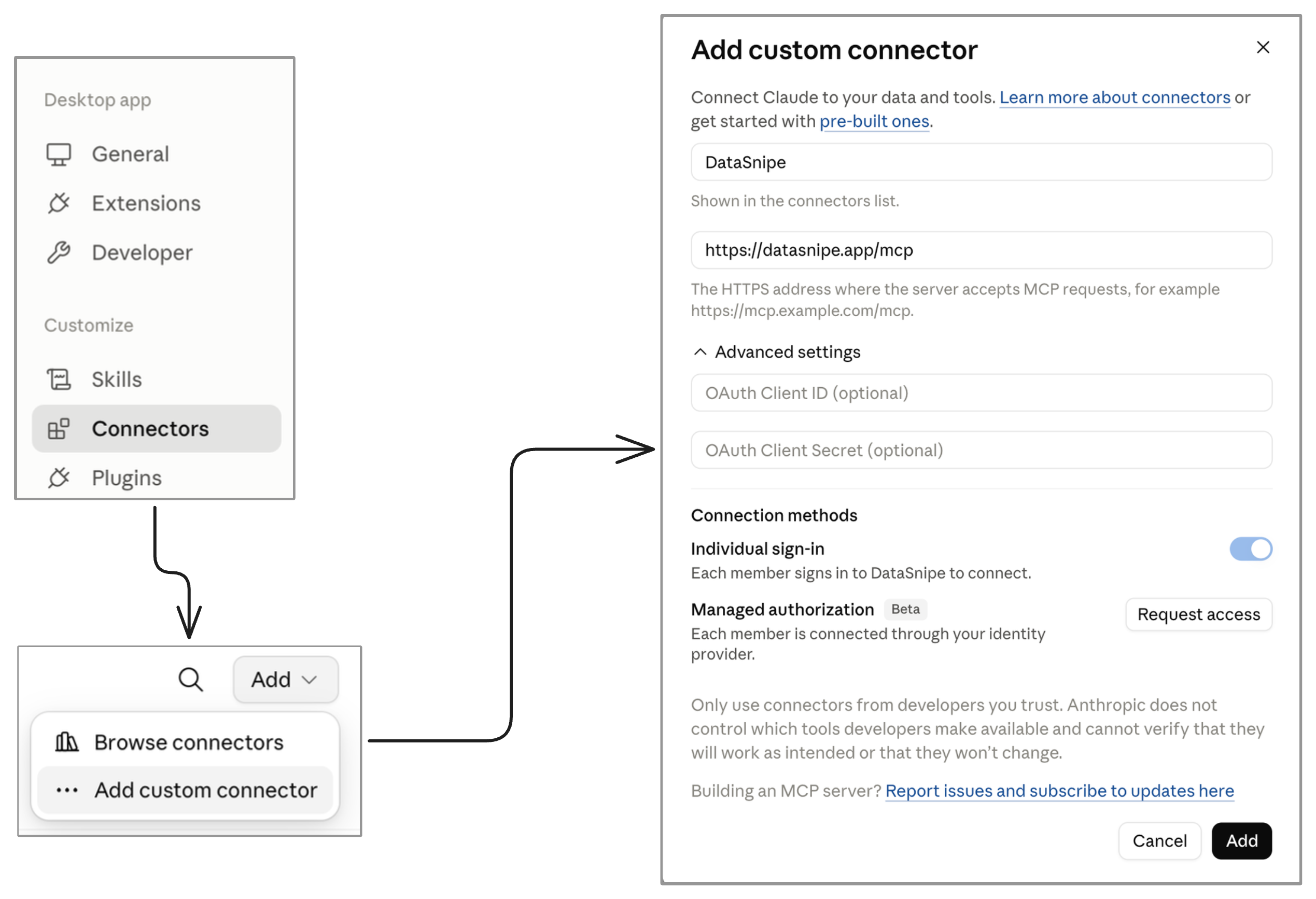
In Claude.ai, open Settings and select Connectors.
-
02
Add a custom connector
Select Add, then Add custom connector.
-
03
Enter the DataSnipe server
Name it DataSnipe and enter
https://datasnipe.app/mcp. -
04
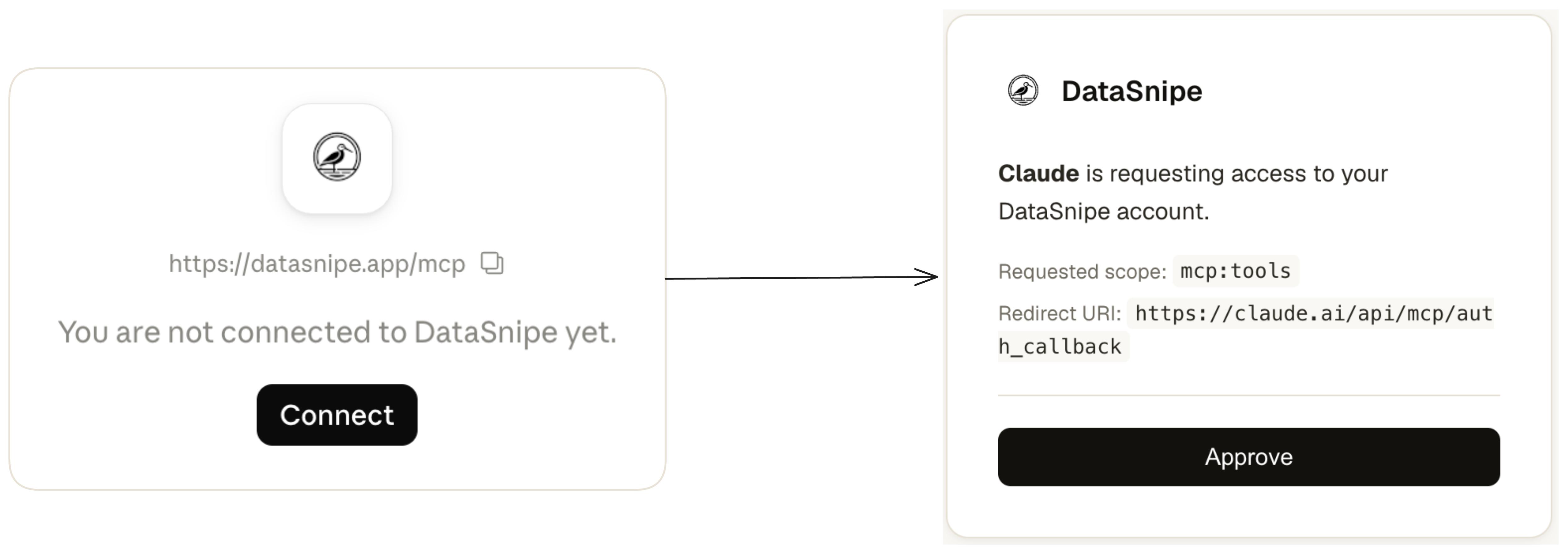
Authorize access
Follow the prompt to sign in to DataSnipe and approve the connection.